Intermediate tutorial
Build and Test an MCP Server from Scratch
Tool integrations should not have to be rewritten for every agent framework. In this guide, you will place a stable protocol boundary in front of an ordinary HTTP API, expose one useful tool, test it without involving a model, and then connect it to an agent.
What you will build
The Model Context Protocol, usually shortened to MCP, gives applications a standard way to present tools and context to AI systems. Instead of writing one adapter for each agent framework, you can implement the integration once as a server and let compatible clients consume it.
The concrete case is a small issue-tracker integration. An agent receives a project key and needs to find unresolved issues. The upstream service already provides an HTTP API:
GET /v1/issues?project=OPS&status=open&limit=10You will wrap that endpoint in a tool named search_open_issues. The tool will validate its input, call the API, normalize the response, and return a compact result that a model can use. The same server can then be connected to different MCP-compatible hosts without changing its business logic.
This tutorial uses TypeScript and Node.js. The API URL and token are supplied through environment variables, so no credentials are embedded in source code. The examples deliberately avoid assuming a particular issue-tracker vendor.
Architecture and protocol boundary
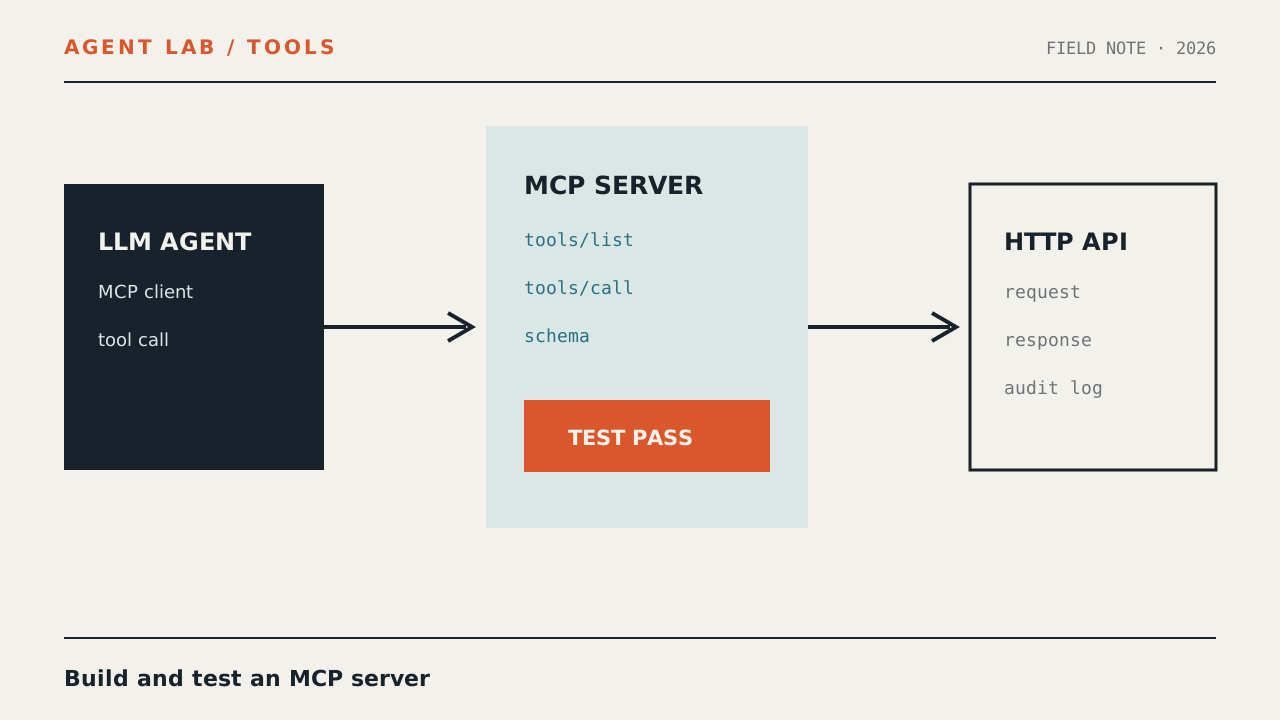
An LLM does not call the issue tracker directly. A host application runs the model and an MCP client. That client connects to your server, discovers its tools, and forwards approved calls.
User
  |
  v
Agent host ---- model
  |
  | MCP client session
  v
Issue MCP server
  |
  | HTTPS + bearer token
  v
Issue tracker API
The separation matters:
- The API client owns authentication, timeouts, HTTP status handling, and response normalization.
- The MCP server owns tool discovery, input validation, tool descriptions, and protocol-shaped results.
- The agent host owns model prompts, tool-call approval, conversation state, and stopping conditions.
This is the practical value of model context protocol servers: protocol compatibility stays separate from vendor-specific API behavior. If you later switch agent frameworks, the issue-tracker adapter remains unchanged as long as the new host supports MCP.
You will use the local standard-input/output transport first. Although the business integration calls an HTTP service, the host-to-server connection remains local and easy to debug. A remote transport can be introduced later without changing the tool implementation.
Prepare the project
Use a supported Node.js release and a recent version of the MCP TypeScript SDK. Package APIs can evolve, so pin dependency versions in your lockfile and treat the compiler as the final authority for the installed SDK.
mkdir issue-mcp-server
cd issue-mcp-server
npm init -y
npm install @modelcontextprotocol/sdk zod
npm install --save-dev typescript tsx @types/node
npx tsc --init
Update package.json so Node treats compiled JavaScript as ES modules:
{
  "name": "issue-mcp-server",
  "private": true,
  "type": "module",
  "scripts": {
    "dev": "tsx src/server.ts",
    "check": "tsc --noEmit",
    "build": "tsc",
    "test:client": "tsx test/client.ts",
    "agent": "tsx examples/agent.ts"
  },
  "dependencies": {
    "@modelcontextprotocol/sdk": "YOUR_INSTALLED_VERSION",
    "zod": "YOUR_INSTALLED_VERSION"
  },
  "devDependencies": {
    "@types/node": "YOUR_INSTALLED_VERSION",
    "tsx": "YOUR_INSTALLED_VERSION",
    "typescript": "YOUR_INSTALLED_VERSION"
  }
}
Do not literally replace versions with arbitrary numbers. After installation, keep the exact versions npm recorded and commit the resulting lockfile.
A compact tsconfig.json is sufficient:
{
  "compilerOptions": {
    "target": "ES2022",
    "module": "NodeNext",
    "moduleResolution": "NodeNext",
    "rootDir": ".",
    "outDir": "dist",
    "strict": true,
    "esModuleInterop": true,
    "skipLibCheck": true,
    "noUncheckedIndexedAccess": true
  },
  "include": ["src/**/*.ts", "test/**/*.ts", "examples/**/*.ts"]
}
Create the directories:
mkdir -p src test examplesThe project will contain:
issue-mcp-server/
├── examples/
│   └── agent.ts
├── src/
│   ├── api.ts
│   └── server.ts
├── test/
│   └── client.ts
├── package.json
└── tsconfig.json
Build the HTTP API client
Start below the protocol layer. This makes API behavior independently testable and prevents transport details from leaking into tool handlers.
Create src/api.ts:
export type Issue = {
  id: string;
  title: string;
  status: string;
  url: string;
};

type ApiIssue = {
  id?: unknown;
  title?: unknown;
  status?: unknown;
  url?: unknown;
};

type ApiResponse = {
  issues?: unknown;
};

export class ApiError extends Error {
  constructor(
    message: string,
    public readonly status?: number
  ) {
    super(message);
    this.name = "ApiError";
  }
}

function requireConfig() {
  const baseUrl = process.env.ISSUES_API_URL;
  const token = process.env.ISSUES_API_TOKEN;

  if (!baseUrl) {
    throw new ApiError("ISSUES_API_URL is not configured");
  }
  if (!token) {
    throw new ApiError("ISSUES_API_TOKEN is not configured");
  }

  return {
    baseUrl: baseUrl.replace(/\/$/, ""),
    token
  };
}

function normalizeIssue(value: ApiIssue): Issue | null {
  if (
    typeof value.id !== "string" ||
    typeof value.title !== "string" ||
    typeof value.status !== "string" ||
    typeof value.url !== "string"
  ) {
    return null;
  }

  return {
    id: value.id,
    title: value.title,
    status: value.status,
    url: value.url
  };
}

export async function searchOpenIssues(
  project: string,
  limit: number,
  signal?: AbortSignal
): Promise<Issue[]> {
  const { baseUrl, token } = requireConfig();
  const url = new URL("/v1/issues", baseUrl);

  url.searchParams.set("project", project);
  url.searchParams.set("status", "open");
  url.searchParams.set("limit", String(limit));

  const timeoutSignal = AbortSignal.timeout(10_000);
  const combinedSignal = signal
    ? AbortSignal.any([signal, timeoutSignal])
    : timeoutSignal;

  let response: Response;

  try {
    response = await fetch(url, {
      method: "GET",
      headers: {
        "accept": "application/json",
        "authorization": `Bearer ${token}`,
        "user-agent": "issue-mcp-server/1.0"
      },
      signal: combinedSignal
    });
  } catch (error) {
    if (error instanceof Error && error.name === "TimeoutError") {
      throw new ApiError("Issue API timed out");
    }
    throw new ApiError("Issue API could not be reached");
  }

  if (!response.ok) {
    const retryAfter = response.headers.get("retry-after");
    const suffix = retryAfter
      ? `; retry after ${retryAfter} seconds`
      : "";

    throw new ApiError(
      `Issue API returned HTTP ${response.status}${suffix}`,
      response.status
    );
  }

  let body: ApiResponse;

  try {
    body = await response.json() as ApiResponse;
  } catch {
    throw new ApiError("Issue API returned invalid JSON");
  }

  if (!Array.isArray(body.issues)) {
    throw new ApiError("Issue API response has no issues array");
  }

  return body.issues
    .map((item) => normalizeIssue(item as ApiIssue))
    .filter((item): item is Issue => item !== null)
    .slice(0, limit);
}
Why normalize the response?
A successful HTTP status does not prove that the body has the expected shape. Returning unverified upstream data creates two problems: the agent receives unstable fields, and malicious or accidental content can consume excessive context. Normalization creates a narrow data contract and drops malformed records.
The token is used only in the authorization header. It is never returned to the model, included in an error, or printed in a log. Preserve this property when adding diagnostics.
Configure the API
Set the variables in the shell that launches the server:
export ISSUES_API_URL="https://issues.example.internal"
export ISSUES_API_TOKEN="replace-with-a-real-token"
Use your actual API origin. Do not commit the token or place it inside an agent configuration that might be shared. In production, use the secret-management facility of the process supervisor or deployment platform.
Implement the MCP server
An MCP tool combines a name, a model-facing description, an input schema, and an execution handler. Good descriptions are operational: they explain when to call the tool, what it returns, and what it does not do.
Create src/server.ts:
import { McpServer } from "@modelcontextprotocol/sdk/server/mcp.js";
import { StdioServerTransport } from
  "@modelcontextprotocol/sdk/server/stdio.js";
import { z } from "zod";
import { ApiError, searchOpenIssues } from "./api.js";

const server = new McpServer({
  name: "issue-search",
  version: "1.0.0"
});

server.registerTool(
  "search_open_issues",
  {
    title: "Search open issues",
    description:
      "Find unresolved issues in one project. Use this when the user " +
      "asks what is open, blocked, or awaiting work. This tool is " +
      "read-only and returns issue IDs, titles, statuses, and URLs.",
    inputSchema: {
      project: z
        .string()
        .trim()
        .min(1)
        .max(40)
        .regex(
          /^[A-Za-z][A-Za-z0-9_-]*$/,
          "Use a project key such as OPS or web-platform"
        ),
      limit: z
        .number()
        .int()
        .min(1)
        .max(25)
        .default(10)
    }
  },
  async ({ project, limit }) => {
    try {
      const issues = await searchOpenIssues(project, limit);

      const summary = issues.length === 0
        ? `No open issues found for ${project}.`
        : issues
            .map(
              (issue) =>
                `${issue.id}: ${issue.title} ` +
                `[${issue.status}] ${issue.url}`
            )
            .join("\n");

      return {
        content: [
          {
            type: "text",
            text: summary
          }
        ],
        structuredContent: {
          project,
          count: issues.length,
          issues
        }
      };
    } catch (error) {
      const message = error instanceof ApiError
        ? error.message
        : "Unexpected server error";

      console.error("search_open_issues failed:", message);

      return {
        isError: true,
        content: [
          {
            type: "text",
            text:
              `Could not search issues for ${project}: ${message}. ` +
              "Do not claim that no issues exist."
          }
        ]
      };
    }
  }
);

const transport = new StdioServerTransport();
await server.connect(transport);
console.error("issue-search MCP server is ready");
The text result remains useful to hosts that only pass textual tool output to a model. The structured result gives capable hosts a predictable object for rendering or downstream processing.
Notice the error wording. An unavailable API is not the same as an empty issue list. Explicitly telling the agent not to interpret failure as “no issues” prevents a subtle but damaging false conclusion.
Validate before crossing the network
The project key is constrained to 40 characters and a conservative character set. The limit cannot exceed 25. These are not merely cosmetic checks: they cap response size, reject ambiguous input early, and reduce the upstream service’s workload.
Type-check the project:
npm run checkIf the SDK version you installed uses a slightly different registration signature, follow its compiler diagnostics and installed type definitions. Keep the architectural boundary intact: schema and protocol logic in server.ts, HTTP behavior in api.ts.
Test the server with a client
Do not introduce a model yet. A direct MCP client produces deterministic evidence that initialization, discovery, validation, execution, and shutdown work.
Create test/client.ts:
import { Client } from
  "@modelcontextprotocol/sdk/client/index.js";
import { StdioClientTransport } from
  "@modelcontextprotocol/sdk/client/stdio.js";

const transport = new StdioClientTransport({
  command: process.execPath,
  args: [
    "--import",
    "tsx",
    "src/server.ts"
  ],
  env: {
    ...process.env,
    ISSUES_API_URL:
      process.env.ISSUES_API_URL ?? "",
    ISSUES_API_TOKEN:
      process.env.ISSUES_API_TOKEN ?? ""
  }
});

const client = new Client({
  name: "issue-search-test",
  version: "1.0.0"
});

try {
  await client.connect(transport);

  const listed = await client.listTools();
  const tool = listed.tools.find(
    (candidate) => candidate.name === "search_open_issues"
  );

  if (!tool) {
    throw new Error("search_open_issues was not discovered");
  }

  console.log("Discovered:", tool.name);

  const result = await client.callTool({
    name: "search_open_issues",
    arguments: {
      project: "OPS",
      limit: 3
    }
  });

  console.log(JSON.stringify(result, null, 2));

  if (result.isError) {
    process.exitCode = 1;
  }
} finally {
  await client.close();
}
Run it only after configuring an endpoint you are authorized to access:
npm run test:clientThis is an integration check, not a promise about a particular output. A successful run should demonstrate all of the following:
- The client completes the protocol handshake.
listToolscontainssearch_open_issues.- The call reaches the configured API.
- The result contains text and, when supported, structured content.
- The process closes without hanging.
Test without a production service
For repeatable automated tests, point ISSUES_API_URL at a local test server that implements the same endpoint. Its fixture can return a deliberately small response:
{
  "issues": [
    {
      "id": "OPS-12",
      "title": "Retry delayed synchronization jobs",
      "status": "open",
      "url": "https://tracker.invalid/issues/OPS-12"
    }
  ]
}
The domain ending in .invalid prevents the fixture from implying a real customer or live service. Your test should assert the shape and transformation, not merely print the result. Useful assertions include:
- The upstream request contains
status=open. - The bearer header is present, but its value is never logged.
- A limit of 3 produces no more than three normalized issues.
- Malformed records are omitted.
- HTTP 401, 429, and 500 responses produce
isError: true. - Invalid input is rejected before an HTTP request is made.
Probe input validation
Temporarily change the client arguments to each invalid case:
{ "project": "", "limit": 3 }
{ "project": "../admin", "limit": 3 }
{ "project": "OPS", "limit": 0 }
{ "project": "OPS", "limit": 1000 }
Each call should fail validation rather than reach the API. Exact error formatting depends on the SDK and client, so assert the failure category instead of brittle prose.
Connect the server to an LLM agent
There are two practical connection patterns. A desktop or IDE host can launch the server from configuration. A custom application can open the client session itself and expose the discovered tools to its model SDK.
Option A: configure an MCP-compatible host
A typical local host configuration has this shape:
{
  "mcpServers": {
    "issue-search": {
      "command": "node",
      "args": [
        "/absolute/path/to/issue-mcp-server/dist/src/server.js"
      ],
      "env": {
        "ISSUES_API_URL": "https://issues.example.internal",
        "ISSUES_API_TOKEN": "supply-through-your-secret-manager"
      }
    }
  }
}
Build before pointing a host at dist:
npm run buildConfiguration filenames and nesting differ between hosts. Adapt the outer configuration to your host, but preserve the executable, arguments, and environment semantics. Restart or reload the host, inspect its tool list, and confirm that search_open_issues appears before sending a natural-language request.
The phrase claude model context protocol often appears in setup searches because Claude-compatible hosts helped popularize MCP. The server built here is not coupled to one model vendor: compatibility depends on the host’s protocol support and transport configuration.
Option B: wire it into a custom agent
A custom agent loop has four essential operations:
- Connect an MCP client and list tools.
- Translate their schemas into the model provider’s tool format.
- Send the user request and tool definitions to the model.
- Execute requested calls through MCP and return their results to the model.
The following provider-neutral skeleton shows the control flow. Replace the placeholder model adapter with the SDK you already use:
import { Client } from
  "@modelcontextprotocol/sdk/client/index.js";
import { StdioClientTransport } from
  "@modelcontextprotocol/sdk/client/stdio.js";

type ModelToolCall = {
  id: string;
  name: string;
  arguments: Record<string, unknown>;
};

type ModelResponse = {
  text?: string;
  toolCalls: ModelToolCall[];
};

async function callModel(input: {
  messages: unknown[];
  tools: unknown[];
}): Promise<ModelResponse> {
  throw new Error(
    "Implement this adapter with your chosen model SDK"
  );
}

const transport = new StdioClientTransport({
  command: "node",
  args: ["dist/src/server.js"],
  env: {
    ...process.env,
    ISSUES_API_URL:
      process.env.ISSUES_API_URL ?? "",
    ISSUES_API_TOKEN:
      process.env.ISSUES_API_TOKEN ?? ""
  }
});

const mcp = new Client({
  name: "issue-agent",
  version: "1.0.0"
});

await mcp.connect(transport);

try {
  const { tools } = await mcp.listTools();

  const modelTools = tools.map((tool) => ({
    type: "function",
    name: tool.name,
    description: tool.description,
    parameters: tool.inputSchema
  }));

  const messages: unknown[] = [
    {
      role: "system",
      content:
        "Use tools for current issue data. Never treat a tool " +
        "error as an empty result. Do not invent issue details."
    },
    {
      role: "user",
      content:
        "List up to three open issues in OPS and summarize them."
    }
  ];

  for (let turn = 0; turn < 6; turn += 1) {
    const response = await callModel({
      messages,
      tools: modelTools
    });

    if (response.toolCalls.length === 0) {
      console.log(response.text ?? "");
      break;
    }

    messages.push({
      role: "assistant",
      content: response
    });

    for (const call of response.toolCalls) {
      const result = await mcp.callTool({
        name: call.name,
        arguments: call.arguments
      });

      messages.push({
        role: "tool",
        toolCallId: call.id,
        content: JSON.stringify(result)
      });
    }
  }
} finally {
  await mcp.close();
}
This skeleton is intentionally incomplete at one boundary: model providers use different request, response, and tool-result types. Implementing callModel is a small adapter; the HTTP integration and MCP server remain reusable.
Enforce calls in application code
Never execute any arbitrary tool name emitted by a model. Build an allowlist from the MCP discovery response or from an explicit policy, validate arguments again at the server, cap the number of turns, and require approval for mutating operations.
const allowed = new Set(
  tools.map((tool) => tool.name)
);

if (!allowed.has(call.name)) {
  throw new Error(`Tool is not allowed: ${call.name}`);
}
Our tool is read-only, but read access can still expose sensitive issue titles. Authorization must be enforced by the upstream API token and, for multi-user applications, by the host’s user-to-credential mapping.
Verify the complete path
Verification should proceed in layers. If the final answer is wrong, this sequence tells you which boundary failed.
1. Static verification
npm run check
npm run build
Confirm that compilation succeeds and that the configured server entry point exists under dist.
2. Protocol verification
npm run test:clientConfirm discovery and a direct tool call before involving a model. Also test one invalid argument and one simulated upstream error.
3. Host verification
Start the chosen host and inspect its registered tools. If the tool is absent, debug process launch and transport configuration. Prompt changes will not repair a failed connection.
4. Agent verification
Use a request that unambiguously requires current tool data:
Find at most three open issues in project OPS. Include each issue ID and URL. If the tool fails, report the failure instead of guessing.
Inspect the run trace or application logs and answer these questions:
- Did the model select
search_open_issues? - Were
projectandlimitvalid? - Did the server make exactly the expected API request?
- Did the final answer use only records returned by the tool?
- On an API error, did the agent avoid claiming that the list was empty?
Do not record a successful result unless you actually observed it in your environment. The commands here define a repeatable verification procedure; they do not invent a passing test run.
Definition of done
| Layer | Evidence |
|---|---|
| Build | Type checking and compilation complete without errors. |
| Discovery | The client lists search_open_issues. |
| Validation | Invalid project keys and limits never reach the API. |
| HTTP | The expected path, query parameters, and authorization header are observed in a controlled test. |
| Errors | Timeouts and non-success statuses produce explicit tool errors. |
| Agent | The agent calls the tool and grounds its response in returned records. |
Failure cases and hardening
The server starts and immediately disappears
The parent host may be closing standard input, the entry-point path may be wrong, or the process may fail during module loading. Run the exact configured command in a terminal and inspect standard error. Confirm the build output path instead of assuming it.
The host reports malformed protocol messages
Application code probably wrote logs to standard output. Replace console.log in the server process with console.error. A client test may print to its own standard output; the spawned server must not.
The tool is visible but calls fail
Check whether environment variables are inherited by the spawned process. GUI applications often receive a different environment from interactive shells. Prefer explicit host configuration or a secure process-level secret provider.
The API returns 401 or 403
Verify the token’s presence, scope, audience, and expiration outside the model loop. Do not return the token, complete authorization header, or raw upstream response to the agent.
The API returns 429
Respect Retry-After when present. Retries should be bounded, use backoff, and apply only to operations safe to repeat. For an interactive agent, a clear temporary-failure result is often better than silently waiting through many retries.
The model repeatedly calls the same tool
Cap tool turns, preserve the previous tool result in conversation state, and tell the model not to repeat an identical call unless the user requests a refresh. The application can also detect a repeated name-and-arguments pair.
The result is too large
Apply limits at several levels: schema maximum, upstream page size, response normalization, and serialized byte size. Prefer adding a second detail tool such as get_issue rather than returning complete issue bodies in a search result.
Untrusted issue text changes agent behavior
Tool output is data, even when it contains instructions addressed to the model. Keep a strong system instruction, label external content clearly, omit unnecessary rich text, and prevent tool results from authorizing additional tools or privileged actions.
Errors expose internal details
Split operator diagnostics from model-visible errors. Logs may include a request ID and safe status metadata. Tool output should contain a stable, actionable message without stack traces, internal hostnames, query secrets, or raw response bodies.
A write tool is added later
Do not copy the read-tool policy unchanged. Mutating tools need narrow scopes, explicit descriptions, idempotency controls, confirmation in the host, audit records, and tests for duplicate execution. Separate read and write credentials where possible.
Limitations and next steps
This implementation is intentionally small. It demonstrates the complete integration path, but it is not yet a universal production gateway.
- Local transport: standard input/output is ideal for one host launching one server. Shared remote access requires an MCP-supported remote transport, authentication, session management, and deployment controls.
- One endpoint: production integrations usually need pagination, issue details, user lookup, and stable error codes.
- One credential context: a shared token cannot enforce per-user permissions. Multi-user systems should bind calls to user-specific authorization.
- No cache: repeated reads always reach the upstream API. Add short-lived caching only when its staleness semantics are acceptable.
- Basic observability: production servers should record safe request identifiers, latency, outcome categories, and rate-limit events without storing sensitive tool arguments by default.
- Provider-neutral agent adapter: the example leaves model-specific message conversion to your chosen SDK.
A sensible expansion order is to add automated fixture tests, stable error codes, pagination, observability, and then remote deployment. Avoid adding many tools before the first one has clear semantics and reliable failure behavior.
What you achieved
You separated a vendor-specific HTTP integration from the agent framework, exposed it through the model context protocol, verified discovery and execution with a client, and defined the final model tool loop. That boundary is the main architectural win: the API adapter is implemented once, while compatible hosts can discover and invoke it without bespoke integration code.
Continue with the Agent Lab Journal guides, or review MCP, agents, tools, and related terminology in the glossary.